


Everyone of us have Gmail account but we do not use the additional options in Gmail. There are plenty of essential and useful options in gmail which saves us lots of time. I have used some of the additional features and i got benefited really.

Here we are going to see some of the essential features in gmail. To do so go to setting at the top right corner of your account.
1. How to add Signature in Gmail?
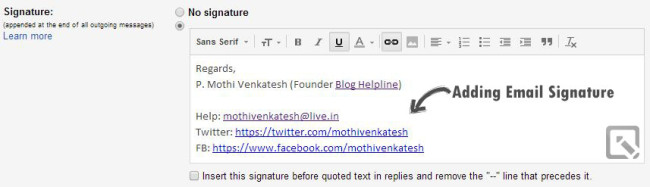
At the end of every mail we will be using some formal words like regards, quotes etc. We get frustrated to add these content every time we mail. So what we can do is add these contents in signature so that it appears automatically whenever you compose a mail.
To get it go to General tab under settings and scroll down, you will get signature option and enable it and fill it with the contents that need to be added in every mail. It will make the readers to know more about you.
2. How to add vacation responder in Gmail?
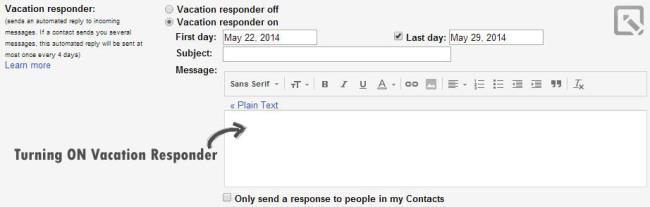
It is one of the rarely used feature in gmail. At times we get continuous mail from our friends or others but we may not be able to respond to it due to power cut or we may busy. At this time vacation responder helps us really. It automatically sends mail to them and we can add a message so that they can understand our situation accordingly.
3. How to add recovery mail address in Gmail?
At times we may forget our mail address and it asks us for a mobile verification code and we don’t get those codes most of the time and we may get frustrated with it. So if you have another gmail account add that address to the current account. To do so, go to Account and Import tab under settings and go to send mail as option and add your secondary email address.
Any change in the primary account will reflect in the secondary account and vice versa. If you totally forget the password of any one the account you can recover using the other mail account.
4. How to remember chat history in Gmail?
We may discuss something important with our friends. Its important for us to see the history of the chat. To do so click chat tab under settings and go to my chat history option and enable chat history.
To access the chat easily go to labels tab under settings and unhide the chat label so that it appears below the inbox and if we click it we get the history of our chats.
5. How to add offline Gmail to our browser?
Requirements: Google Chrome Browser
To do so go to offline tab under settings and click install offline. Then it redirects to chrome app launcher and add this app to the browser. The shortcut of offline gmail appears on the chrome browser. What it does is it collects all the mail data including the archives and stores it in the cache so that we can access it even when a power failure occurs.